Owned application / Active development
A shared world.
In the browser.
A 3D scene becomes an application when people can use it together.
Masterwork VTT brings a virtual tabletop into the browser. Scene rendering, asset preparation, user controls and networked state have to work as one system. It is a studio-owned product and an example of the engineering behind a substantial interactive 3D website.
Sign in to Masterwork VTT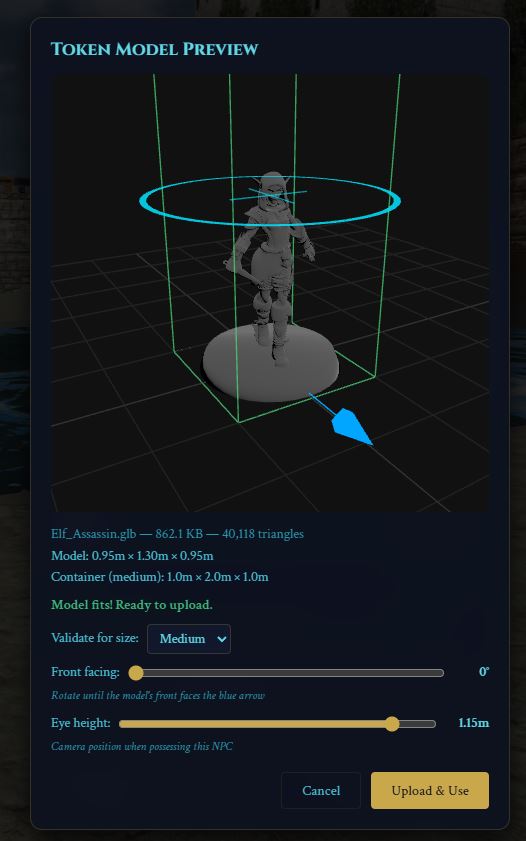
- Project type
- Studio-owned application
- Studio role
- 3D application and interface development
- Core stack
- Three.js / Vite / WebSocket
More than displaying a model.
A tabletop needs a shared space that people can navigate and interact with. The application has to connect the visible scene to controls, object state and session activity, rather than treating the 3D view as a separate animation.
The same development concerns appear in collaborative product reviews, spatial planning and browser-based training. These are potential applications of the approach, not claims that this game already implements those business workflows.
Assets, interaction and shared state.
Bring GLB assets into a usable scene
The model-import preview exposes dimensions, facing direction and eye height before a token is used. Preparing an asset includes deciding how it fits and behaves in the application, as well as how it looks.
Connect the interface to the world
Scene and token tools give the host controls over the tabletop. Lighting, object interaction and navigation need to stay understandable while the 3D view responds to user input.
Keep session activity connected
A WebSocket layer exchanges session messages and handles reconnection. Network behavior is a distinct part of the application, alongside the renderer and interface.
Decide what needs to load.
Detailed assets have a cost in transfer size, texture memory and rendering work. An interactive application needs an asset strategy tied to the current scene and user action.
For a product catalog, that may mean loading a base model and compatible features when needed instead of loading every possible combination. For a tabletop, it means considering the environment and characters needed for the current session.
An evolving studio product.
Masterwork VTT is actively developed. The image records a development build; the public interface and available features may change. Start at the account page and sign in before accessing the virtual tabletop.
A commissioned application needs its own scope for permissions, device support, concurrent users and performance testing. This project demonstrates an approach to building connected 3D software; it is not a published benchmark for every device or network.
What should users do inside your 3D application?
Describe the scene, the actions users need, and whether people will work alone or together. Include available models, target devices and the systems the application needs to connect to.
Start a conversation